Best Claude Code skills in 2026
Best Claude Code skills in 2026, ranked: Document Skills for file output, skill-creator for custom libraries, mcp-builder for new tools, and more.
Claude Code's Skills feature packages expertise — file generation, browser testing, brand rules, MCP scaffolding — into folders Claude loads automatically when a task matches. Best overall: the Document Skills bundle (docx, pdf, pptx, xlsx). Best for building a custom library: skill-creator. Best for browser QA: webapp-testing. Best for extending tool access: mcp-builder.
TL;DR
- Best claude code skills in 2026: Document Skills (docx/pdf/pptx/xlsx) wins for output generation — install it first.
- skill-creator is the right pick for teams writing their own skill library instead of copying folders by hand.
- webapp-testing covers Playwright-driven browser checks; mcp-builder scaffolds new MCP servers Claude Code can call.
- Skills live as local folders — install once and drift starts the moment you add a second machine.
Why this matters
A Claude Code skill is a folder containing a SKILL.md file and, optionally, scripts or reference docs. Claude scans the available skill names and descriptions, matches one against the current task, and loads only that skill's context instead of the whole library at once.
Anthropic ships a handful of example skills with Claude Code. The rest come from the community, your own team, or a synced skills library you maintain across every machine you code on in 2026.
Picking the wrong five means Claude either skips a skill that should have fired or loads three at once and burns context on the wrong one. Picking the right five is the difference between Claude producing a usable .docx on the first pass and you re-prompting for twenty minutes.
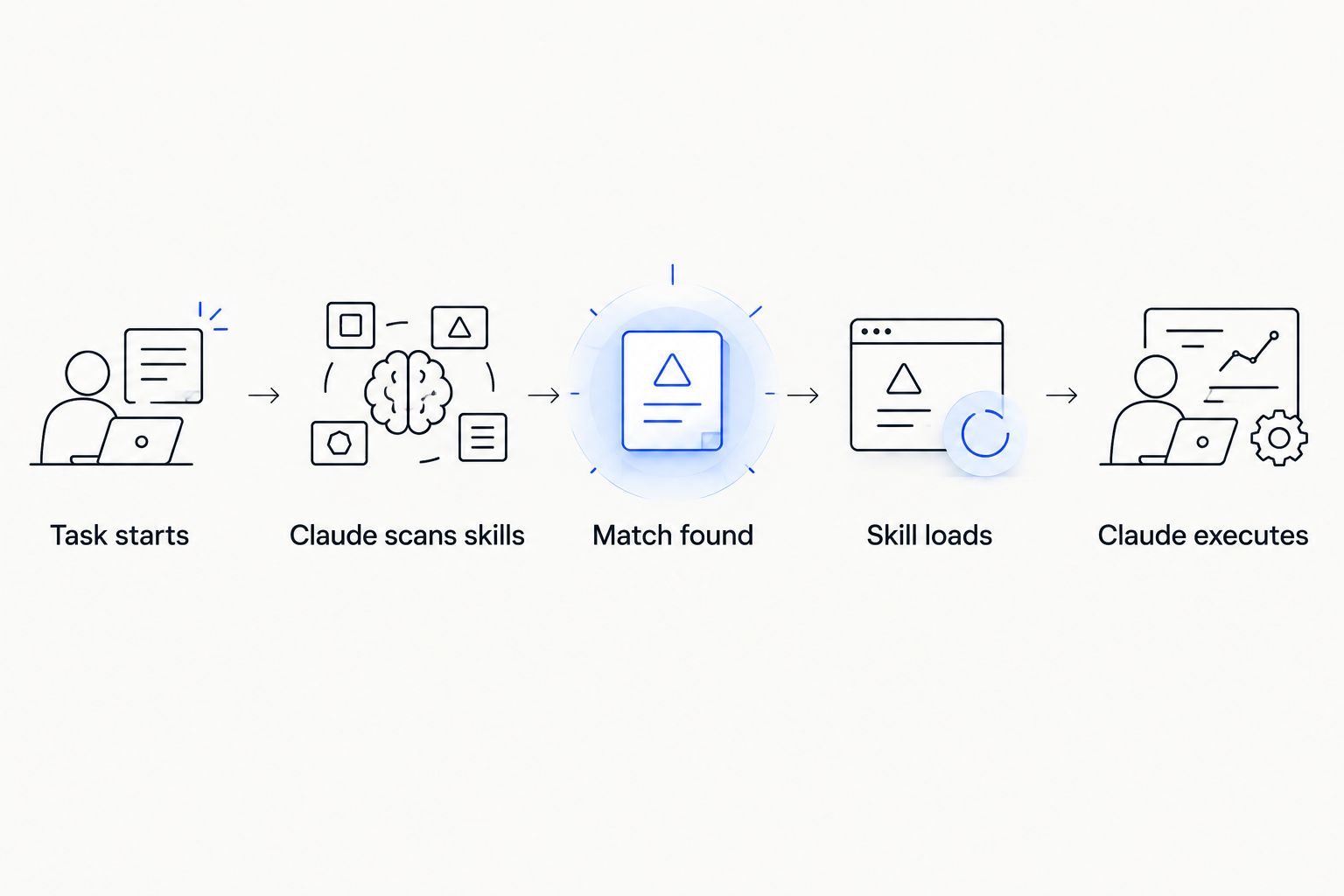
Claude only loads the one skill that matches the task — not the whole library.
What makes the best Claude Code skill
- Maintenance cadence — Anthropic-maintained skills track Claude Code releases; community skills often lag behind SKILL.md schema changes.
- Trigger precision — the skill's description has to be specific enough that Claude picks it for the right task and ignores it otherwise.
- Single responsibility — one skill, one job; skills that try to cover five workflows at once misfire more often.
- Setup complexity — a drop-in folder beats a skill that needs a build step or extra dependencies.
- Cross-machine parity — whether the skill still works when you switch from your laptop to a cloud dev box.
- Context cost — how much of the context window the skill's instructions eat before Claude even starts the task.
Best Claude Code skills in 2026: at a glance
| Skill | Best for | Standout feature | Key limitation |
|---|---|---|---|
| Document Skills (docx, pdf, pptx, xlsx) | Generating office files from Claude Code | One Anthropic-maintained bundle covers four formats | No help with heavy-formula spreadsheets |
| skill-creator | Teams building a custom skill library | Scaffolds new SKILL.md files for you | Only useful once you have a second skill worth building |
| webapp-testing | Browser and frontend QA | Drives Playwright directly from a Claude Code session | Needs a running local dev server to point at |
| mcp-builder | Extending Claude Code with new tool servers | Scaffolds a working MCP server skeleton in one pass | You still write the tool logic yourself |
| brand-guidelines | Content and marketing teams enforcing style rules | Keeps generated copy inside a defined voice | Only as good as the guideline doc you feed it |
| Git workflow skills | Solo developers writing faster commit messages | Turns a diff into a commit message with no prompt template | Community-maintained; quality varies by author |
1. Document Skills (docx, pdf, pptx, xlsx): best Claude Code skill for generating office files
Document Skills is the bundle Anthropic ships for producing real office files instead of markdown pretending to be one. Claude loads the matching skill for the format you asked for and handles the binary structure — styles, page breaks, slide layouts — that a raw prompt routinely gets wrong.
Document Skills pros:
- One install covers four file formats instead of four separate skills
- Maintained alongside Claude Code releases, so schema drift is rare
- Handles formatting quirks (headers, page breaks, slide masters) a plain prompt misses
Document Skills cons:
- Spreadsheet output is weak once formulas get complex
- Long documents still need a manual pass for formatting edge cases
Document Skills verdict: Install.
2. skill-creator: best Claude Code skill for building a custom skill library
skill-creator is a meta-skill: instead of doing a task, it helps you write the next SKILL.md. It asks about the workflow you're trying to capture and generates a starting folder structure, description, and file layout that Claude Code recognizes.
skill-creator pros:
- Removes the guesswork around SKILL.md formatting and description phrasing
- Speeds up building an internal skill library instead of copying examples by hand
- Encourages single-responsibility skills instead of one giant catch-all folder
skill-creator cons:
- Adds no value until you actually have a repeatable workflow worth codifying
- Generated skills still need a human review pass before teammates rely on them
skill-creator verdict: Install if you're building more than two custom skills.
3. webapp-testing: best Claude Code skill for browser and frontend QA
webapp-testing wires Claude Code to a Playwright-driven browser session so it can click through a UI, check rendered output, and catch regressions without you narrating every step. It fires when the task description mentions testing a running web app.
webapp-testing pros:
- Runs real browser interactions instead of guessing from source code alone
- Catches visual and functional regressions in the same pass
- Fits naturally into a frontend PR review workflow
webapp-testing cons:
- Needs a local dev server already running and reachable
- Slower than a static code review for simple changes
webapp-testing verdict: Install for frontend-heavy repos.
4. mcp-builder: best Claude Code skill for extending Claude Code with new tools
mcp-builder scaffolds a working MCP server skeleton — the boilerplate, the tool registration, the transport wiring — so you're writing the actual tool logic on day one instead of debugging setup. It pairs naturally with the best MCP servers for Claude Code list if you're deciding what to build versus what to install off the shelf.
mcp-builder pros:
- Cuts MCP server setup time down to writing the tool functions themselves
- Generates a structure that matches the current MCP spec, avoiding stale examples
- Useful even for engineers who've never built an MCP server before
mcp-builder cons:
- Doesn't write your tool's business logic — that's still on you
- Best suited to Node or Python; other runtimes need manual adaptation
mcp-builder verdict: Install if you're building your own MCP servers.
5. brand-guidelines: best Claude Code skill for content and marketing teams
brand-guidelines keeps Claude's generated copy — release notes, docs, marketing snippets — inside a defined voice and rule set instead of drifting toward generic AI phrasing. It loads whenever the task involves writing customer-facing text.
brand-guidelines pros:
- Cuts down on manual editing passes for tone and terminology
- Reusable across every writing task, not just one document type
- Works with whatever style guide you feed it — no rewrite needed per project
brand-guidelines cons:
- Output quality is a direct function of how specific your guideline doc is
- Vague guideline docs produce vague enforcement
brand-guidelines verdict: Install if you already have a written style guide.
6. Git workflow skills: best Claude Code skill for solo developers
Community-built git workflow skills turn a diff into a commit message or PR description without a prompt template every time. They're lightweight, single-purpose, and easy to swap out if one author's version doesn't fit your style.
Git workflow skills pros:
- Fast install, single job, easy to replace
- Removes the "write a commit message" prompt from daily habit
Git workflow skills cons:
- Community-maintained, so quality and update cadence vary by author
- Convention mismatches (Conventional Commits vs. free text) need manual tuning
Git workflow skills verdict: Install if commit hygiene is a recurring friction point; skip if your team already has a hook for it.
How we ranked
Each skill on this list was weighed against the same six criteria: maintenance cadence, trigger precision, single responsibility, setup complexity, cross-machine parity, and context cost. Anthropic-maintained skills scored higher on maintenance and parity by default; community skills earned their spot on precision and setup speed instead.
"A skill folder sitting on one laptop is a skill your team can't rely on."
That's the parity problem in one line — a skill installed once, on one machine, is a skill that goes stale the moment you switch devices or onboard a teammate.
Keep skills in sync across machines
Install a skill once and carry it to every device without copying folders.
Which Claude Code skill should you choose?
If you only install one thing in 2026, install the Document Skills bundle — it covers the most common output request (a real file, not a markdown wall) with the least setup. If your team is past the point of copying example skills and needs its own library, add skill-creator next. Frontend teams should add webapp-testing before their next PR review cycle; anyone extending Claude Code with new tools should reach for mcp-builder before writing MCP boilerplate from scratch.
FAQ
What is a Claude Code skill?
A Claude Code skill is a folder with a SKILL.md file, and optionally scripts or reference docs, that Claude loads automatically when a task matches the skill's description. It scopes context to just that one job instead of loading everything at once.
What's the best Claude Code skill for generating documents?
The Document Skills bundle (docx, pdf, pptx, xlsx) is the best claude code skills pick for office file generation in 2026 because it's maintained alongside Claude Code itself and covers four formats in one install.
Is skill-creator better than writing a SKILL.md by hand?
skill-creator speeds up the first draft of a new skill's structure and description, but the result still needs a human review pass before a team relies on it. It's a starting point, not a replacement for judgment.
How many skills should you install in Claude Code?
Install only the skills that match a recurring, specific task. Overlapping or vague skills reduce trigger precision, so five well-scoped skills usually outperform fifteen loosely defined ones.
Do Claude Code skills work the same way on Cursor or GitHub Copilot?
No. Skills are a Claude Code-specific mechanism built around SKILL.md files; Cursor and GitHub Copilot use their own extension and MCP integration patterns instead.
Can Claude Code skills slow down responses?
A skill only loads when it matches the task, so an idle skill costs nothing. Loading multiple overlapping skills for one task is what actually burns extra context and time.
How do you keep skills in sync across multiple machines?
Without a sync layer, skills have to be copied folder by folder to every laptop and dev box you use. A background sync agent carries installs and updates across machines instead of manual copying.
Are Anthropic's official skills better than community skills?
Official skills like Document Skills score higher on maintenance cadence and cross-machine parity because they track Claude Code releases directly. Community skills can still win on niche, single-purpose tasks official skills don't cover.
One last thing
The skill that saves the most time in 2026 isn't the most impressive one — it's the one that still works after you switch from your laptop to a cloud dev box mid-project. Test every skill on a second machine before you trust it on a deadline.