Best MCP servers for GitHub Copilot in 2026
Best MCP servers for GitHub Copilot in 2026: GitHub MCP Server wins overall, ranked by use case with pros, cons, and verdicts for each pick.
Best overall: GitHub MCP Server. Best for schema-aware SQL work: Postgres MCP Server. Best for browser-driven QA: Playwright MCP Server. Best for persistent context across sessions: Memory MCP Server. Best for live web grounding: Brave Search MCP Server.
TL;DR
- GitHub MCP Server is the strongest all-around pick among the best mcp servers for github copilot in 2026.
- Postgres MCP Server wins for schema-aware SQL; Playwright MCP Server wins for browser-driven QA.
- Memory MCP Server and Context7 solve different problems: session persistence versus current library docs.
- Sentry MCP Server pulls error traces into the editor instead of a separate dashboard tab.
- Running seven-plus servers across three machines by hand is the real bottleneck, not the server choice.
Why this matters
GitHub Copilot picked up native MCP support through GitHub's agent framework, and by 2026 the same open protocol that powers Claude Code and Cursor now runs inside Copilot Chat and the Copilot coding agent. That's a real shift: instead of Copilot guessing at a database schema or a PR diff from context alone, an MCP server hands it a structured tool call it can execute directly.
The hard part isn't finding servers — the MCP ecosystem lists hundreds by now. It's picking the seven or eight that map to what you actually do daily, then keeping them running the same way across a laptop, a desktop, and a CI box. This list is sorted by job, not hype, using the same discipline behind the best MCP servers for Claude Code, since Copilot and Claude Code draw from the same server ecosystem.
What makes the best MCP server for GitHub Copilot
- Maintainer — official (GitHub, Sentry, a named vendor) beats an anonymous fork with no commit history
- Permission scope — a server that reads a diff shouldn't also get write access to production tables
- Tool count — five clearly named tools beat twenty vague ones Copilot has to guess between
- Execution model — local (stdio) servers keep credentials on your machine; hosted (SSE/HTTP) servers trade that for zero local setup
- Update cadence — MCP is still young in 2026, so a repo with no commits in six months is a red flag
- Cross-agent support — the server should behave the same in Copilot, Claude Code, and Cursor if you touch more than one
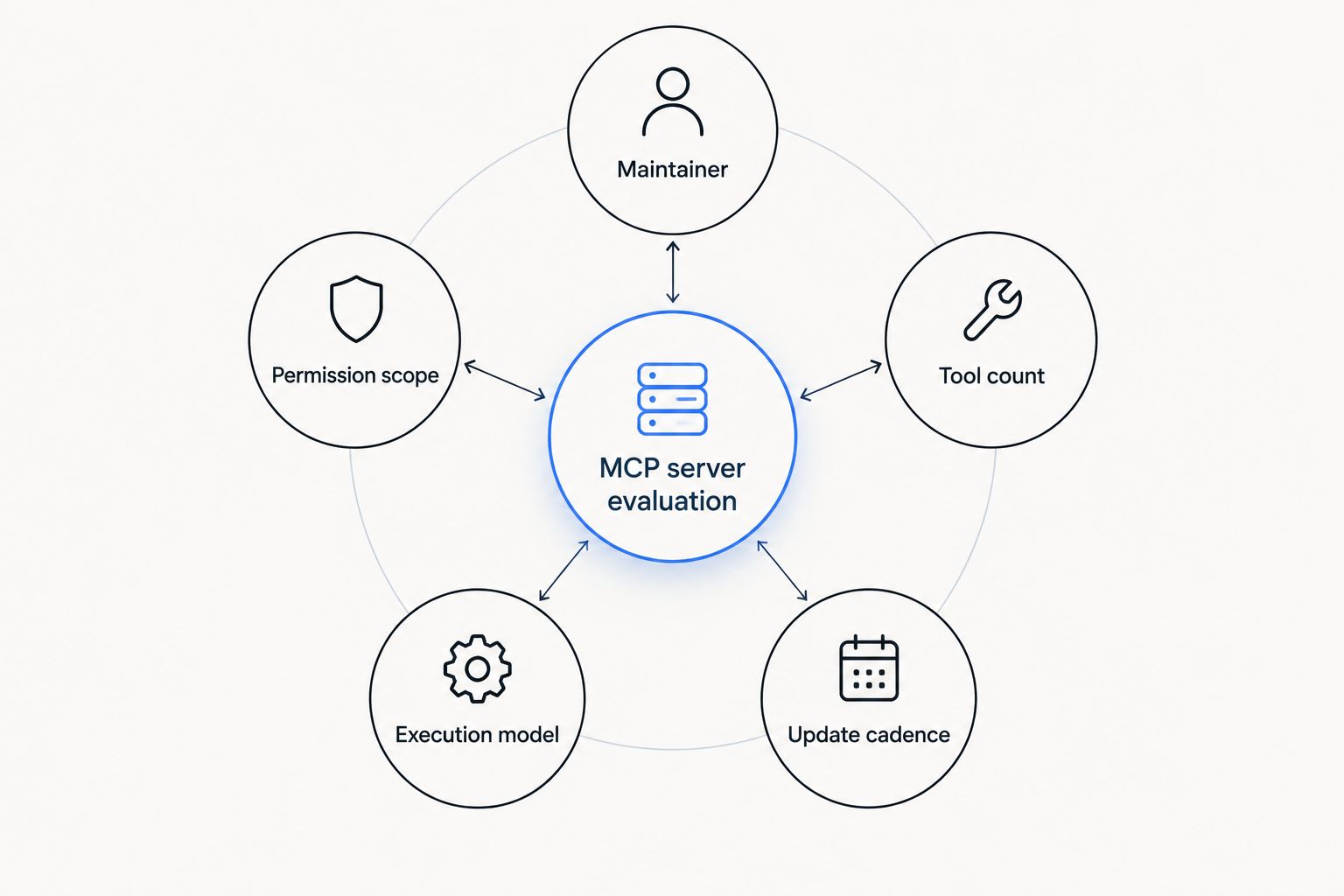
Permission scope and maintainer matter more than feature count when picking a server.
Best MCP servers for GitHub Copilot in 2026 — at a glance
| # | Server | Best for | Standout feature | Key limitation |
|---|---|---|---|---|
| 1 | GitHub MCP Server | Repo and PR operations | Native GitHub API coverage in one server | Broad scope by default unless restricted |
| 2 | Filesystem MCP Server | Local file context | Directory-level read/write scoping | No semantic search, just paths |
| 3 | Playwright MCP Server | Browser-driven QA | Drives a real browser instead of scraping HTML | Slower than a lightweight assertion library |
| 4 | Postgres MCP Server | Schema-aware SQL work | Reads live schema before Copilot writes a query | Read-only by default |
| 5 | Sentry MCP Server | Error triage in the editor | Pulls stack traces into chat directly | Only useful if you already run Sentry |
| 6 | Context7 | Current library docs | Version-matched docs instead of stale training data | Coverage depends on the library being indexed |
| 7 | Memory MCP Server | Persistent session context | Keeps facts across restarts | Storage is local, doesn't sync machines |
1. GitHub MCP Server: best MCP server for repo and PR operations
GitHub's own MCP server exposes repo, issue, PR, and Actions data as direct tool calls instead of shell commands Copilot has to interpret. It's the default pick when the job is anything git: reading a diff before suggesting a fix, filing an issue from a failing test, or checking a workflow run without leaving the editor.
GitHub MCP Server pros:
- Ships from GitHub directly, no third-party trust gap
- Covers issues, PRs, Actions, and code search in one server
- Works the same in Copilot Chat and the Copilot coding agent
GitHub MCP Server cons:
- Default token scope is broad; needs per-repo restriction to stay safe
- No database or filesystem access — it only knows GitHub
Best for: teams that live in PR review and issue triage. Verdict: Buy.
2. Filesystem MCP Server: best MCP server for local file context
The Filesystem MCP Server gives Copilot scoped read and write access to directories you name explicitly, instead of the editor's built-in context window guessing what's relevant. It's the plain, low-drama pick for repos with a lot of generated or vendored code Copilot shouldn't wander into uninvited.
Filesystem MCP Server pros:
- Directory-level scoping keeps Copilot out of node_modules and build output
- No network dependency — runs entirely local
- Simple enough to audit in an afternoon
Filesystem MCP Server cons:
- No semantic search; it's paths and globs, not meaning
- Adds little over Copilot's native workspace context in small repos
Best for: monorepos with folders Copilot should never touch. Verdict: Buy.
3. Playwright MCP Server: best MCP server for browser-driven QA
Playwright's MCP server drives an actual browser — clicking, filling forms, reading rendered DOM — so Copilot can write and verify UI tests against real behavior instead of guessing from a component file. It's overkill for a pure API project and close to essential for anything with a frontend that breaks silently.
Playwright MCP Server pros:
- Verifies UI behavior instead of assuming from source code
- Same automation engine most teams already use for e2e tests
- Screenshots and traces come back as usable context
Playwright MCP Server cons:
- Slower per call than a lightweight assertion server
- Needs a working browser environment on the host machine
Best for: frontend-heavy repos with flaky manual QA. Verdict: Buy.
4. Postgres MCP Server: best MCP server for schema-aware SQL work
The Postgres MCP Server reads live schema, indexes, and constraints before Copilot writes a query, which cuts down on the hallucinated column names that plague blind SQL generation. It's built for read-heavy work like reporting queries and migration review, not for letting Copilot execute writes unsupervised.
Postgres MCP Server pros:
- Reads current schema instead of relying on stale docs or comments
- Catches type mismatches before a query hits the database
- Works against staging or production read replicas safely
Postgres MCP Server cons:
- Read-only by default; write access needs a separate, riskier setup
- Only helps with Postgres — no MySQL or SQLite equivalent bundled in
Best for: teams writing a lot of ad hoc SQL. Verdict: Buy.
5. Sentry MCP Server: best MCP server for error triage in the editor
Sentry's MCP server pulls stack traces, breadcrumbs, and issue history straight into Copilot Chat, so fixing a production error doesn't mean tabbing out to a dashboard and copy-pasting a trace back in. It's narrow by design — it only knows what Sentry knows.
Sentry MCP Server pros:
- Cuts the copy-paste step between error dashboard and editor
- Issue context includes breadcrumbs, not just the raw stack trace
- Scoped to the Sentry project you connect, nothing broader
Sentry MCP Server cons:
- Useless if the team doesn't already run Sentry
- Doesn't fix anything — it hands context, not patches
Best for: teams doing daily production error triage. Verdict: Buy.
6. Context7: best MCP server for current library docs
Context7 pulls version-matched documentation for a library instead of letting Copilot fall back on training data that's a year or two stale by 2026. It matters most for fast-moving frameworks where the API from six months ago doesn't match what's installed.
Context7 pros:
- Docs match the actual installed version, not a training-data snapshot
- Cuts down on suggestions that call deprecated methods
- Works across most popular open-source libraries
Context7 cons:
- Coverage depends on the library being indexed at all
- Adds a network round-trip Copilot doesn't need for well-known APIs
Best for: projects on libraries that ship breaking changes often. Verdict: Buy.
7. Memory MCP Server: best MCP server for persistent context across sessions
The Memory MCP Server keeps facts, decisions, and preferences across restarts, so Copilot doesn't relearn your project conventions every session. It solves a real annoyance — repeating the same architectural context every time — but the storage is local, so it doesn't travel with you machine to machine on its own.
Memory MCP Server pros:
- Persists project facts and decisions across restarts
- Cuts repeated context-setting at the start of every session
- Lightweight — no external service dependency
Memory MCP Server cons:
- Storage is local; nothing syncs to a second machine by default
- Can accumulate stale facts if nothing prunes it
Best for: solo devs on one primary machine. Verdict: Hold — pair it with a sync tool like Loadout if you work across more than one machine.
How we ranked
Every server on this list ships from an identifiable maintainer — GitHub, Sentry, or a named open-source project — not an anonymous npm package. Ranking followed the criteria above in order: permission scope first, tool count and clarity second, execution model and update cadence third. A server that needed broad, unscoped access to do a narrow job got marked down even when the feature list looked good on paper.
Running more than one of these at once
Seven servers is a reasonable Copilot setup in 2026. It's also seven configs to keep in sync if you work from a laptop, a desktop, and a CI runner, and MCP servers don't sync themselves — a change on one machine stays there until you copy it over by hand. Loadout runs a background agent that mirrors installs, toggles, and restores across every machine tied to one account, so adding the Postgres MCP Server on a laptop pushes it to the desktop without a second install.
Sync these MCP servers everywhere
One install propagates across every machine on your account.
Which MCP server should you choose?
If Copilot only gets one server, make it the GitHub MCP Server — it covers the highest volume of daily tasks: diffs, issues, PR review. Add Postgres MCP Server the moment SQL enters the picture, and Playwright MCP Server the moment a frontend bug can't be reproduced from source alone. Skip Memory MCP Server on a single-machine setup where sessions rarely span more than a day; add it back once you're closing and reopening long-running projects across weeks. For 2026 Copilot workspaces running three or more of these servers, the setup cost shifts from picking a server to keeping every config identical across machines.
FAQ
What is the best MCP server for GitHub Copilot in 2026?
GitHub MCP Server is the best overall pick for GitHub Copilot in 2026 because it covers repo, issue, and PR operations that make up most daily Copilot Chat use. Pair it with Postgres MCP Server or Playwright MCP Server depending on whether the work is database-heavy or frontend-heavy.
Does GitHub Copilot support MCP servers in 2026?
Yes, GitHub Copilot Chat and the Copilot coding agent both support Model Context Protocol servers as of 2026, the same protocol Claude Code and Cursor use. A server built for one of those agents generally works in Copilot with the same install.
Is the GitHub MCP Server better than the Filesystem MCP Server?
They solve different problems, not competing ones: GitHub MCP Server handles repo, PR, and issue data, while Filesystem MCP Server scopes Copilot's read and write access to local directories. Most Copilot setups in 2026 run both at once.
How many MCP servers should a GitHub Copilot setup run?
Five to eight servers covers most workflows without turning tool selection into its own problem: one for git operations, one for the database, one for browser QA, and a couple for docs and error context. Running more than that without a way to keep configs synced across machines usually creates more overhead than it saves.
Do MCP servers sync across multiple machines automatically?
No, most MCP servers install per machine and stay there; adding one on a laptop does nothing for a desktop or CI runner unless something copies the config over. Tools like Loadout handle that sync layer separately from the servers themselves.
Is Context7 worth adding alongside GitHub MCP Server?
Yes, if the project depends on fast-moving libraries, since Context7 pulls version-matched docs so Copilot doesn't suggest a deprecated method from stale training data. It's redundant on projects that only touch stable, rarely-updated APIs.
Does the Postgres MCP Server allow Copilot to write to the database?
By default no, the Postgres MCP Server runs read-only, which is the safer setup for schema-aware query generation. Write access requires a separate, more permissive configuration most teams skip.
One last thing
The single biggest failure mode across every MCP server in this list isn't a bad tool call — it's an unscoped token. A GitHub MCP Server connected with a personal access token that has org-wide write access turns one compromised Copilot session into a much bigger problem than a bad suggestion. Scope every token to the specific repo or database the server actually needs before the first install, not after the second incident.