Best agent skills marketplaces in 2026
Loadout leads the best agent skills marketplace ranking for 2026 by syncing skills and MCP servers across machines. See how it compares to five others.
Best overall: Loadout, because it is the only entry here built to sync skills and MCP servers across every machine a developer touches. Best for MCP server discovery: Smithery, since its registry exists purely to help you find servers, not to keep installs consistent once you have them. Best for team-shared Continue.dev blocks: Continue.dev Hub. Best for browsing community Cursor rules: Cursor Directory. Best for GitHub-native governance: GitHub's MCP registry.
TL;DR
- Loadout wins the agent skills marketplace comparison for 2026 by syncing skills and MCP servers across every machine automatically.
- Smithery is the strongest pure discovery registry for finding new MCP servers before you install anything.
- Continue.dev Hub only makes sense once a team is standardized end to end on Continue.dev.
- Cursor Directory is a research stop, not an install mechanism — copy-paste only, no sync.
- GitHub's MCP registry centralizes discovery for Copilot-heavy teams but does not sync a developer's personal machines.
Why this matters
Software teams running Claude Code, Codex, Cursor, and GitHub Copilot side by side are drowning in per-machine setup, and picking the right agent skills marketplace in 2026 comes down to one question: do you need a discovery tool or a sync tool. Loadout is built around the sync problem — a background agent carries installs, toggles, and restores across every machine a developer owns instead of leaving version drift to memory.
That distinction matters more than catalog size. Some marketplaces exist to help you find skills and MCP servers you didn't know existed. Others exist to keep what you already picked identical across a laptop, a desktop, and a cloud dev box. Conflating the two is how teams end up with five different agent configs across five machines and no clean way to tell which one is current.
What makes the best agent skills marketplace
- Cross-machine sync — installs, toggles, and restores propagate to every machine without a manual copy step
- Catalog breadth — enough MCP servers and skills listed that discovery isn't a dead end
- Multi-agent compatibility — works across Claude Code, Codex, Cursor, and GitHub Copilot, not just one harness
- Governance and account scoping — permissions follow the developer or the org, not a single laptop
- Update and restore mechanics — toggling a skill off or rolling back a version doesn't mean reinstalling from scratch
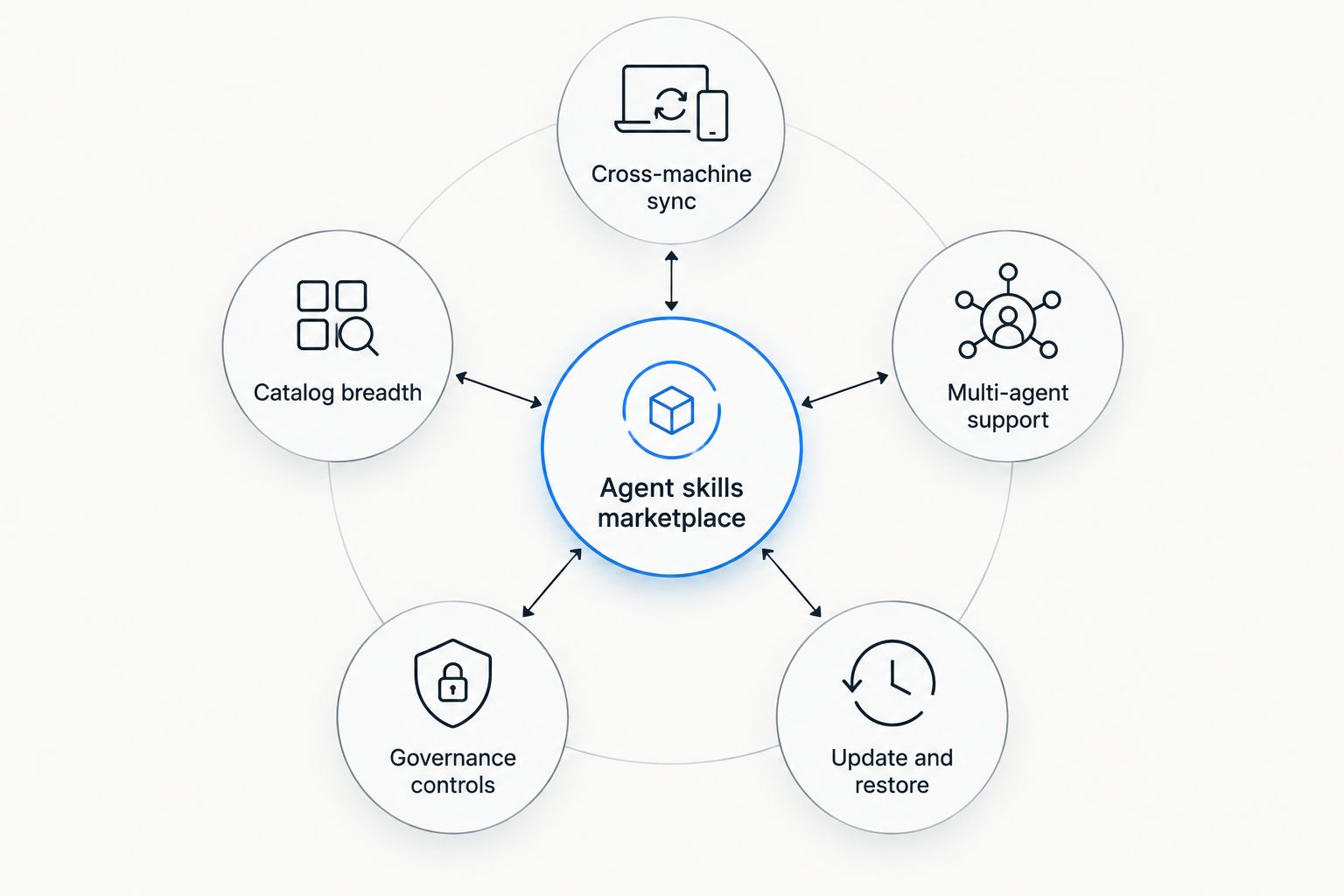
Catalog size is one criterion among five — sync and governance matter just as much.
Agent skills marketplace comparison: at a glance
| Marketplace | Best for | Standout feature | Key limitation |
|---|---|---|---|
| Loadout | Syncing skills and MCP servers across every machine | Background agent propagates installs, toggles, and restores in realtime | Not a skill-authoring tool — pairs with an underlying coding agent |
| Smithery | Discovering MCP servers | Large, searchable registry with a standardized manifest format | Install stays per-machine, no built-in sync |
| Continue.dev Hub | Sharing custom blocks inside a Continue.dev team | Blocks are versioned and shareable via a hub URL | Locked to the Continue.dev ecosystem |
| Cursor Directory | Browsing community Cursor rules and prompts | Large, browsable index of .cursorrules patterns | Copy-paste only, no install or sync mechanism |
| GitHub's MCP registry | GitHub Copilot teams wanting centralized discovery | Discovery ties into existing GitHub org permissions | Doesn't sync a developer's personal machines |
1. Loadout: best agent skills marketplace for syncing across every machine
Loadout syncs skills and MCP servers across every machine a developer uses, via a background agent that carries installs, toggles, and restores over a private realtime channel. There's no clone, no copy, no per-machine ritual — connect a new laptop and the fleet catches up on its own. It works across harnesses, including setups built around Claude Code MCP servers, Codex, Cursor, and GitHub Copilot.
Loadout pros:
- Background agent syncs in realtime — installs, toggles, and restores mirror across machines automatically
- Account-scoped, so configuration follows the developer, not a single laptop
- Works across multiple coding agents instead of locking into one harness
- No manual copy step required when a new machine joins the fleet
Loadout cons:
- It's a sync and marketplace layer, not a from-scratch skill-authoring environment
- Still requires the underlying coding agent (Claude Code, Codex, and so on) to be installed
- An offline machine only reconciles once it reconnects, not before
Best for: developers and teams running the same skills and MCP servers on more than one machine. Verdict: Buy.
2. Smithery: best agent skills marketplace for discovering MCP servers
Smithery is a public registry built for finding MCP servers, with a searchable catalog and a standardized manifest format that makes a server's capabilities legible before install. It's a discovery layer, not a sync layer — installing a server on one machine doesn't propagate it anywhere else. Teams evaluating OpenAI Codex MCP servers often start here before wiring anything into an agent.
Smithery pros:
- Large, searchable catalog of MCP servers
- Standardized manifest format makes comparing servers straightforward
- Good starting point for finding servers nobody on the team knew existed
Smithery cons:
- Install and configuration stay per-machine — no fleet sync
- No built-in skills layer, just server listings
- Team governance features are limited for managing many seats at once
Best for: developers hunting for which MCP servers exist before deciding what to standardize on. Verdict: Buy as a discovery layer — pair it with a sync tool once you know what you're keeping.
3. Continue.dev Hub: best agent skills marketplace for team-shared Continue.dev blocks
Continue.dev Hub packages rules, docs, and MCP configs into shareable blocks that a team can pull into a shared assistant. Blocks version like code, which makes them auditable, but sharing is a pull action — a teammate has to fetch the block, nothing pushes it automatically.
Continue.dev Hub pros:
- Blocks are versioned and reviewable like code
- Clean model for teams standardized entirely on Continue.dev
- Sharing is explicit, which suits teams that want change control
Continue.dev Hub cons:
- Tied to the Continue.dev ecosystem — doesn't extend to Claude Code or Codex
- Sharing is manual pull, not automatic sync
- Less useful once a team runs mixed coding agents
Best for: teams that have standardized on Continue.dev and want versioned, shareable blocks. Verdict: Hold — solid for a Continue-only shop, a poor fit for mixed-harness teams.
4. Cursor Directory: best agent skills marketplace for browsing community Cursor rules
Cursor Directory is a community index of .cursorrules files and prompt patterns for Cursor. It's browsable without an account and useful for finding a starting template fast, but distribution is copy-paste — there's no install button and no mechanism to keep a copied rule current as the original updates. Teams comparing Cursor MCP servers alongside rules tend to treat this as a research stop rather than an ongoing tool.
Cursor Directory pros:
- Large, browsable index of community rule patterns
- No account required to browse
- Fast way to find a starting template
Cursor Directory cons:
- Copy-paste only, no install or sync mechanism
- Scoped to Cursor, not other coding agents
- Quality varies since submissions aren't vetted
Best for: developers researching Cursor rule patterns before writing their own. Verdict: Wait — bookmark it for research, don't rely on it for fleet management.
5. GitHub's MCP registry: best agent skills marketplace for GitHub-native governance
GitHub's MCP registry centralizes MCP server discovery inside GitHub's existing org and repo permissions, so a team already standardized on GitHub Copilot gets one source of truth instead of scattered listings. Discovery ties into workspace context, a real advantage for Copilot-heavy shops evaluating GitHub Copilot MCP servers.
GitHub's MCP registry pros:
- Backed by GitHub's existing authentication and org permissions
- Discovery ties into repo and Copilot workspace context
- Centralizes listings that used to be scattered across community sites
GitHub's MCP registry cons:
- Younger catalog than community registries like Smithery
- Strongest inside the GitHub/Copilot stack, weaker for mixed Claude Code or Codex setups
- Doesn't sync installs across a developer's personal machines
Best for: GitHub Copilot teams that want registry discovery inside existing org permissions. Verdict: Hold — strong if you're all-in on GitHub, thin outside it.
How we ranked
Every entry got weighed against the same five criteria: cross-machine sync, catalog breadth, multi-agent compatibility, governance, and update or restore mechanics. Loadout ranks first because it's the only one that owns sync as its core job rather than a side effect. Smithery, Continue.dev Hub, and GitHub's MCP registry each score well on catalog breadth or governance inside their own lane, but none of them close the sync gap. Cursor Directory ranks last because it doesn't attempt sync, install, or governance — it's a browsing tool, and it's honest about that scope.
Sync skills across your fleet
Connect a machine and let the background agent handle the rest.
Which agent skills marketplace should you choose?
If the job is keeping skills and MCP servers identical across a laptop, a desktop, and a cloud dev box, Loadout is the default answer in 2026 — nothing else on this list treats sync as the primary feature. If you're still in the research phase and just need to know what MCP servers exist, start with a registry like Smithery or GitHub's MCP registry, then sync whatever you decide to keep.
Teams weighing whether to build custom agent tooling in-house instead of adopting a marketplace often end up comparing notes with AI agent development companies before pricing out a build, then circle back to an existing marketplace once the in-house estimate lands. For most engineering teams in 2026, that detour ends the same way: buying the sync layer costs less than maintaining one.
FAQ
What's the best agent skills marketplace in 2026?
Loadout is the best agent skills marketplace overall in 2026 for teams syncing skills and MCP servers across multiple machines. Smithery is the better pick if you only need to discover MCP servers, not sync them.
Is Smithery better than Loadout?
They solve different problems, so it's not a direct swap. Smithery is a discovery registry for finding MCP servers; Loadout syncs whatever you've already installed across every machine you own.
Does Cursor Directory sync rules automatically?
No. Cursor Directory is copy-paste distribution with no install or sync mechanism, so a rule you copy stays static even after the original updates.
Can Continue.dev Hub blocks work in Claude Code?
No. Continue.dev Hub blocks are tied to the Continue.dev ecosystem and don't extend to Claude Code, Codex, or other harnesses.
What's the difference between a skills marketplace and an MCP server registry?
An MCP server registry, like Smithery or GitHub's MCP registry, helps you find servers to install. A skills marketplace with sync, like Loadout, keeps what you've installed consistent across every machine you use.
Does GitHub's MCP registry work with Claude Code or Codex?
GitHub's MCP registry is built around the GitHub Copilot stack and org permissions, so it's strongest there. It doesn't sync installs across a developer's personal machines regardless of which agent is running.
What happens to installed skills on an offline machine?
With a sync-based marketplace like Loadout, an offline machine catches up once it reconnects rather than syncing in real time while disconnected. Registries like Smithery don't sync at all, so an offline machine simply stays as it was last configured.
One last thing
The gap most teams miss isn't catalog size — it's the moment someone toggles a skill off on one machine and forgets it's still active on three others. Catalog breadth gets the attention in marketplace comparisons, but the actual failure mode in daily use is drift between machines nobody's watching. That's the criterion worth weighing heaviest when picking an agent skills marketplace for 2026, and it's the one most listicles skip.